Release notes 2024
This page contains release notes that apply to all APIs on the Base platform for the 2024 versions.
2024r13
Fix for Windows services not reconnecting after losing connection
Services in Mediagenix Base platform can be installed as Windows services. This allows them to run at all times, even when no Windows user is physically logged on to the server.
Previously, when
-
a service installed as Windows service was running;
-
lost connection to the database occurred, then
the service would crash and log a Windows event with ID 0:
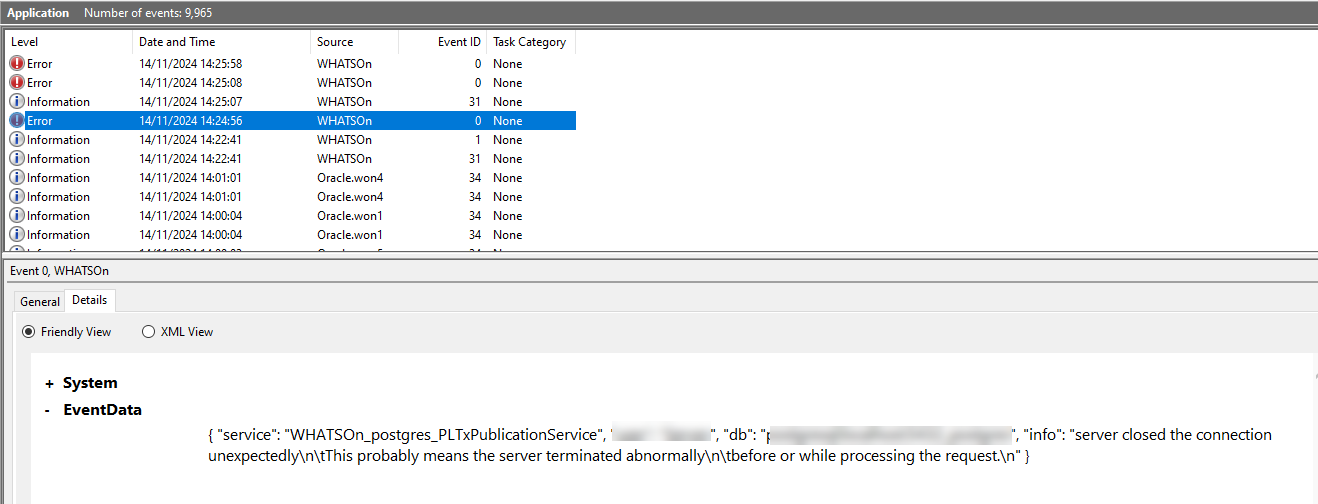
Before version 2024r6, the service would attempt to reconnect but this was not done anymore due to a change for internal Mediagenix use related to patches.
This issue has been fixed. When a Windows service loses connection to the database, a Windows event with ID 4 will be logged again and the service will attempt to reconnect afterwards.
Fix for ID of Windows event for restored database connection
Services installed as Windows services generate messages in the Windows event viewer while they are running.
Previously, when the service would restore connection to the database, an event with ID 5 would be generated.
However, since improvements were done to the structure of the events in version 2023r5, it would be logged as an event with ID 2, which was already done for the shut down of the service.
This issue has been fixed. When the service restores connection to the database, an event with ID 5 is logged again.
2024r12
Health check call and terminology changes in YAMLs of business APIs
This is only relevant for API developers.
In a previous version, a health check call was added to all business APIs. However, only the YAML of the publication API was updated, not the other ones.
Additionally, in version 2024r6, WHATS’ON was renamed to Mediagenix Base platform. This terminology had not been updated in the YAMLs yet.
From this version, the YAMLs of all APIs were updated to add this call and change the name. The latest version can be retrieved by using the GET /api call.
Error with status code 409 for multi-user errors in BAPI
Sometimes, when users are making changes to the same object at the same time or the object has been changed in the meantime, a multi-user error can occur.
Previously, when this would happen while making changes through the business API, the service would crash and an error with status code 500 would be returned, which is usually used for internal server errors.
From this version, an error message with status code 409 will be returned in case of a multi-user error.
An example:
{
    "statusCode": "409",
    "message": "REST request aborted because of multi user error [more information]",
    "timestamp": "2024-09-27T13:38:34Z"
}
The service will also log the following:
A multiuser error occurred: [more information]
Aborting request call
Fix for REST services using same port
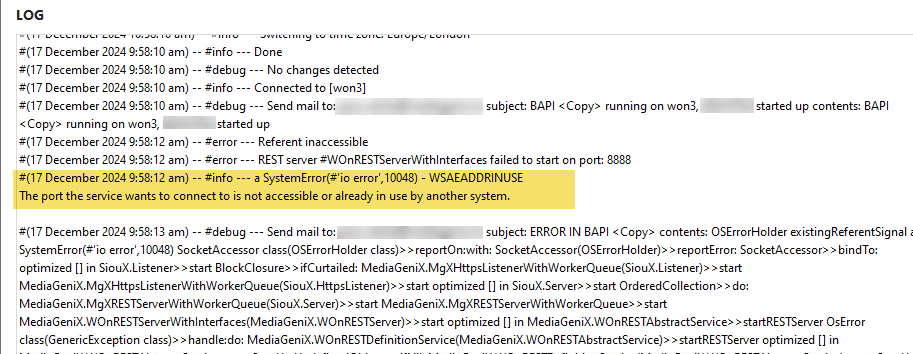
In a previous version, an issue was fixed for two REST services using the same port (RN-4973). In 2024r4, REST services were changed to allow multithreading. Because of this change, the previous fix was no longer working.
When two REST services were using the same port, one of the services would hang. When the service was installed as a Windows service, this would cause the status to be Start pending. When the operating system would go over all services to start them and get to a service with this status, it would keep waiting on a response to know if it was a success or failure. This prevented other services from starting.
This issue has been fixed. When two REST services use the same port, one of them will stop, show an error in the log and create a crash report.
Fix for duration of token returned by REST services
In a previous version, when
-
a REST service was set to use User-based JWT for authentication;
-
a certain Access token validity period was defined, for example, 600 seconds;
-
the REST service was started and a user would send a
POST /logincall to retrieve a token,
the expiration timestamp of the token in the Issued tokens tab on the user account would indicate the validity period was 7 days. This was because of an error when enabling multithreading on the REST services in version 2024r4.
This issue has been fixed. The correct validity period is applied again.
2024r10
Health check for REST services
REST services, such as the Business API interface service, configurable REST interface service, communicate through HTTP requests to perform standard functions like creating, reading, updating and deleting objects.
In some cases, these services are running but are unable to handle requests. For example, it might have ran out of database connections or is already processing another call. In a Cloud environment or for services installed as Windows services, it can be more difficult to check if services are still running.
From this version, the healthcheck endpoint has been added to the REST services. These will be visible in the service log when starting the service.
For example, in the business API service, for the content API, the URL will be as follows: [path]/content/v1/healthcheck
When a call is sent to that endpoint, and the service is running, a 200 response is returned with the following body:
{
    "healthy": true
}
Due to an error, this was only added to the YAML of the publication API. This will be corrected in an upcoming version. However, the check can already be used.
Warnings for HTTP services without linked certificates
Certificates are used by services to communicate securely with external services through HTTPS. They ensure that the website or web service you are talking to is the one it claims to be.
It was already possible to configure a certificate on REST and SOAP services using the TLS certificate property on the Security tab of the service configuration.
However, this was not a mandatory field, meaning it was possible to start the services without having a secure connection.
From this version, to avoid this happening by accident, message 6167 appears when no certificate is defined and the user saves after editing the service configuration:
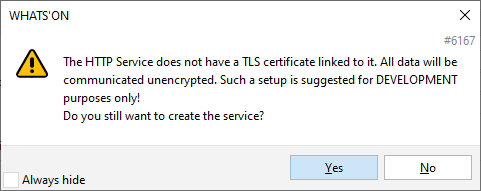
When clicking Yes, the service configuration is saved. When clicking No, the changes are not saved and a certificate can be linked first.
When a REST or SOAP service is started without a certificate, the service log will show a warning as well:

2024r8
Fix for POST or PUT REST calls with long bodies
Previously, every POST or PUT call, for regular REST calls and the BAPIs, tried to log the contents of the call without any new line characters or tab characters. Removing these characters is a very slow operation, especially when the calls have long bodies.
This issue has been fixed. When sending a POST or PUT call with a large amount of data, the process is more efficient.
2024r7
Fix for performance of BAPI while checking permissions
Since a previous version, the business APIs check the permissions of the user that is logged into the API when processing calls (see 2021r2). However, this could decrease the performance of the APIs.
In this version, a fix has been done on the permission checking to improve performance.
2024r4
Multithreading using multiple workers in REST services
Previously, when using REST services in WHATS’ON Base, only one call at the same time could be processed.
For example, if user A’s call took 1 minute and user B’s 1 second, user B had to wait 1 minute before their shorter call was processed.
To process multiple calls at the same time, you would need to start 5 instances of the service with different ports, which made it difficult to configure and used up a lot of memory.
Usually, in this case, a load balancer was used between the client and WHATS’ON, which would randomly redirect the calls to one of the services so multiple calls could be processed. If not, the client would need to be configured to send calls randomly.
This meant configuration outside WHATS’ON was usually needed to make the parallel REST calls possible.
From this version, changes have been made to make multithreading or parallelism possible on REST services in WHATS’ON.
Number of workers
On REST services, such as the Business API interface service or configurable REST interface service, the Number of workers field has been added.
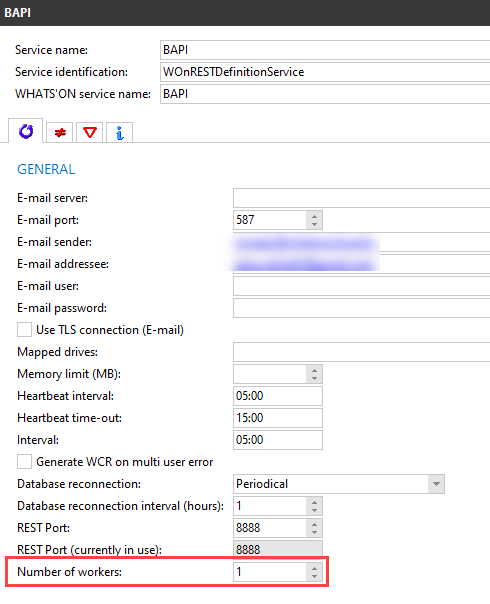
This field defines how many workers can process REST calls in parallel. It is by default set to 1 to reflect the previous behaviour.
When the service is started, it will look at this number and internally start as many processes or workers as the defined number. For example, if you set it to 5, 5 workers are started, meaning 5 calls could be handled at the same time.
If a REST call is sent to the service, it will act as a load balancer and give the task to one of these workers. This means only one instance of the service now needs to run to handle more calls, which also takes up less memory.
If more calls are sent than there are workers, the calls are added to a queue. Once a worker is done, it will take up the call and process it.
Limitations
Note that this number has a limitation. Entering a number like 100.000 would be possible but would not work as WHATS’ON can only use 4GB of memory. Additionally, each worker needs two database connections and there is usually also a limitation on the number of connections.
It is recommended to look at the number of cores on the machine processor to define this number. For example, if your computer has 10 cores, it is advised to set the Number of workers field equal to or lower than 10.
Logging for REST service
For REST services with this Number of workers field, logging will now be different. When the Logging check box on the Logging tab is selected, multiple log files will be created: one for the main service and one per worker. For example, if the Number of workers is set to 2, there will be 3 log files.

The main service log (for example, 20240426_001_won1_WOnRESTDefinitionService.log) will now contain less information. The details of the calls processed by the workers will be stored in separate worker logs. (For example, 20240426_001_WORKER_1_won1_WOnRESTDefinitionService.log)
26 March 2024 16:09:52.631	REST Worker 1 started.
26 March 2024 16:10:24.347	GET /content/v1/api HTTP/1.1
26 March 2024 16:10:24.366	Started
26 March 2024 16:10:24.370	Changes detected: Processed 2 transactions in 4 milliseconds (246 bytes in 1 loops).
26 March 2024 16:10:24.371	Execution duration: 4 ms
26 March 2024 16:10:24.371	Finished
26 March 2024 16:10:24.389	HTTP/1.1 200 OK
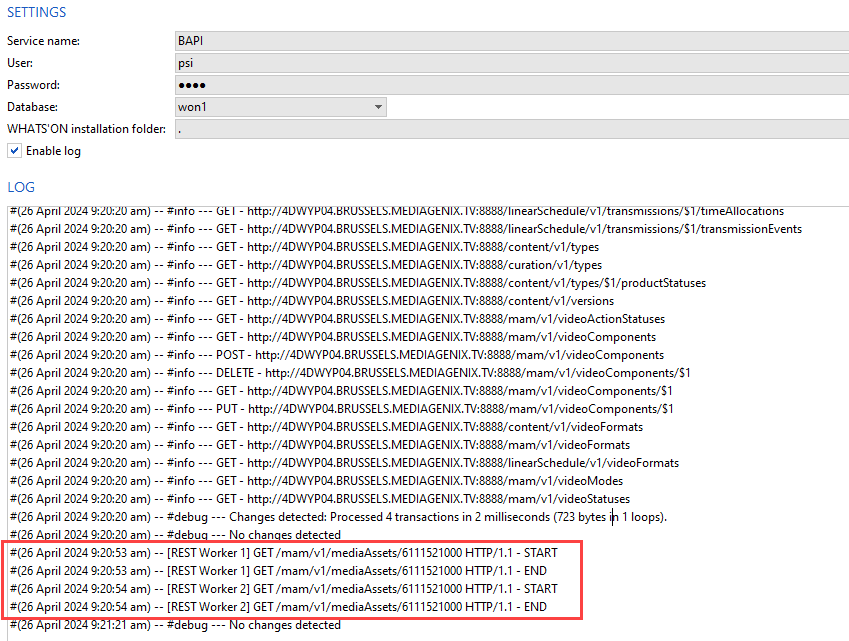
In the service launcher log, the full content of each call is also not shown anymore. For example, for the Business API interface service, only the start and end of the executed calls per worker will be logged for monitoring purposes. Otherwise, it would seem as if the service was not doing anything while in fact, the workers were taking care of the tasks. Note that this does not show up in the main log file of the service.
In the following screenshot, calls were executed immediately after each other so each worker took one call.
The WHATS'ON Services_2024r4 and higher.pdf technical document has been updated for this change. It can also be found on the FTP.